



Data Subject Request
Your Data, Your Rights
The right to access grants users the right to get access to their data in your records. The GDPR, CCPA, LGPD, and other data privacy laws require businesses to be transparent with users about their data. You must let your users know what you know about them.

Discovery
Problem + Solution = Outcome
Problem
-
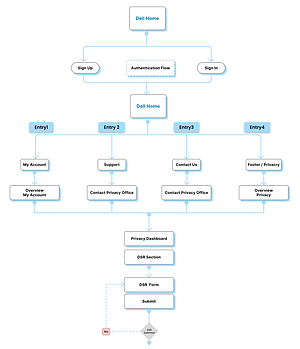
Single entry point to reach the DSR screen is through My Account on Dell.com.
-
Cumbersome to fill in the long DSR form with personal details again when the user is logged In.
-
No clue when, where, and how users would navigate to DSR, the personal data that was requested.
-
Not able to track the status of the personal information request raised.
Solution
-
Implement multiple access points for the DSR screen:
-
Include a prominent link or button in the website footer, accessible from any page.
-
Integrate a quick-access option in the main navigation menu or user dashboard, separate from My Account.
-
Streamline the DSR form for logged-in users:
-
Auto-populate known user details (name, email) to reduce form fields.
-
Provide a condensed form specifically for logged-in users with pre-filled sections.
-
Enhance communication and clarity on data delivery:
-
Provide a confirmation email upon successful submission of DSR.
-
Outline expected delivery timelines and methods for receiving requested data.
-
Offer a dedicated section within the user account to track progress and delivery status.
-
Introduce a status tracking feature for DSR requests
-
Create a dedicated "My Requests" section within the user account.
-
Include real-time updates on the progress of each DSR request (e.g., received, processing, delivered).
-
Allow users to receive notifications via email or SMS when there are updates to their DSR request status.
Outcome
-
Implementing these UX solutions will lead to a more user-friendly and transparent DSR experience on Dell.com:
-
Users can easily access the DSR screen from various entry points on the website.
-
Logged-in users benefit from a simplified DSR form with pre-filled details.
-
Clear communication channels ensure users understand the process and timeline for receiving requested personal data.
-
The introduction of status tracking capabilities empowers users to monitor the progress of their DSR requests conveniently.
Approach - Double Dimond Method

Why DSR
1
ProblemStatement
-
A single entry point to reach the DSR screen is through My Account.
-
Cumbersome to fill in the long DSR form with personal details again when the user is Logged In
-
No clue on when, where, and how users would get DSR the personal data that was requested
-
Not able to track the status of the personal information request raised
2
Goal
-
The primary goal is to understand how users perceive data subject as their right to object / to process their data and have it stopped, their expectations
-
To know how users raise DSR on dell.com.
-
Understanding the users' struggles and suggestions
-
Evolve with an interface that is easy to use, rich in experience, and design consistency in align with the latest design system
3
Process
-
User Interviews
-
OGSM
-
Feature List
-
Competitive Analysis
-
Weekly SME Sessions
-
UI Design Ideation
-
Design Reviews
USERS
User who are
Curious
User who are
Sensitive
The target audience between
35 - 60

General global who public users who engage in both online and offline shoppin
User who are
Proactive
User who are
Careful
User who are
Working & Non-working Group
User Interview


Interpretation

01.
Most users do not understand what is browsing data or how it is being used – FAQs/Video/Educate/Empower?

02.
Shopping Preferences – Users understand that shopping preferences are monitored to recommend related products

03.
Most users looked into support, contact us, services and footer of the home screen – Can this be entry point be leveraged?


50%
Users search to raise personal information request from different entry channels from the home page
10%
Users gave up searching
20%
Time extra consumption searching
30%
Some users were not familiar the legal term like the Data Subject Request
Matrices
01.
Time Taken
Min. 23 Sec / Max. 1036 Seconds (17 min 16 Sec.)
03. Discoverability
6 Quickly connected to DSR (40%)
6 Searched and connected to DSR 40%)
3 Searched but failed(20%)
02.
Task Completion
8 Successfully completed(53%)
4 Success with help(26%)
3 Failed to submit(20%)
04
User Expectations
1 of 15 participants felt that the clarity of the language can be made better
Statement
-
Time Taken
Ranged from a minimum of 23 seconds to a maximum of 1036 seconds. -
User Engagement
50% of users sought personal information requests through various entry channels on the home page, while 10% gave up searching. -
Efficiency
Users spent 20% more time searching than expected, with 30% of users unfamiliar with legal terms like "data subject request". -
Task Completion
53% successfully completed the task, 26% succeeded with assistance, and 20% failed to submit.
-
Discoverability
40% quickly connected to the Data Subject Request (DSR), 40% searched and connected to DSR, while 20% searched but failed to connect. -
User Expectations
1 out of 15 participants suggested improving the clarity of language. -
Overall Rating
Rated from a minimum of 3 to a maximum of 10, with a scale of 1 (Very Hard) to 10 (Extremely Easy).

Persona
About Liz
Liz is a detail-oriented marketing professional who values her privacy. She frequently uses Dell.com for both personal and professional needs, from purchasing laptops for work to exploring the latest tech gadgets.
Demographics:
Age: 32
Occupation: Marketing Specialist
Location: Austin, Texas, USA
Tech Proficiency:
Moderate
Goals
Challenges
Control Over Data: To manage and control the personal data Dell.com holds.
Transparent Process: A clear understanding of how Dell handles and processes data.
Liz David
Limited Tech Savvy: Although familiar with online platforms, Liz may require clear instructions for navigating the DSR process.
Time Sensitivity: As a working professional, Liz needs a quick and straightforward DSR submission process.
Motivations
Frustrations
Privacy Concerns: Highly conscious of data privacy, Liz wants control over his personal information stored on Dell.com.
Efficiency: Values a streamlined and efficient process for submitting a Data Subject Request (DSR).
Trust in Dell: Believes in Dell's commitment to user privacy and expects a user-friendly experience for DSR submission.
Complex Procedures: Dislikes the single way processes and unclear instructions.
Delayed Responses: Frustrated by prolonged response times to DSRs.

Define
Research Findings
There may be no better way to communicate what we do than through images. As you browse our site, take a few moments to let your eyes linger here, and see if you can get a feel for our signature touch.

Experience Strategy
Work Flow

Feature List
Conceptualization


Wireframe


Prototype


This wraps up the DSR case study
That’s the full overview of the DSR project